Drawing the Ground and Implementing the Pipes
Hellooooo 🤟
How are you?
In this chapter we will draw the ground and also implement the pipes.
Demo of this chapter done:
If you haven't read the previous chapter yet: Loading a Texture and Drawing the Background (part 2)
Summary:
- Drawing the ground
- Implementing the Pipes
- Timer
- Counting Frames
- Delta Time
- Spawning Pipes
- Creating Pipes at random Y
Drawing the ground
Let's begin with the ground because it is straight and simple, we will do almost the same as we did to draw and scroll the background:
public class Game1 : Game
{
    ...
    private float _bgScrollSpeed = 0.5f; // changed
    private float _groundScrollSpeed = 2f;

    ...

    private Rectangle _groundSrcRect = new Rectangle(584, 0, 336, 112);
    private Vector2 _groundPos1;
    private Vector2 _groundPos2 = new Vector2(336f, 0f);

    ...

    protected override void Initialize()
    {
        var windowHeight = _graphics.PreferredBackBufferHeight;
        _groundPos1.Y = windowHeight - _groundSrcRect.Height;
        _groundPos2.Y = _groundPos1.Y;

        base.Initialize();
    }

    ...

    protected override void Update(GameTime gameTime)
    {
        ...

        _groundPos1.X -= _groundScrollSpeed;
        if (_groundPos1.X + _groundSrcRect.Width < 0f)
            _groundPos1.X = 0f;

        _groundPos2.X -= _groundScrollSpeed;
        if (_groundPos2.X + _groundSrcRect.Width < windowWidth)
            _groundPos2.X = windowWidth;

        base.Update(gameTime);
    }

    protected override void Draw(GameTime gameTime)
    {
        GraphicsDevice.Clear(Color.CornflowerBlue);

        _spriteBatch.Begin(samplerState: SamplerState.PointClamp);

        ...

        _spriteBatch.Draw(_texture, _groundPos1, _groundSrcRect, Color.White);
        _spriteBatch.Draw(_texture, _groundPos2, _groundSrcRect, Color.White);

        _spriteBatch.End();

        base.Draw(gameTime);
    }
}
The idea is pratically the same, so much that I just duplicated the code that draw and scroll the background and did a few changes:
- Update the source rectangle to matches where the ground is located in the texture atlas/spritesheet.
- Changed the ground initial position.
- Created a second scroll speed variable to create a parallax effect.
Just for organization, lets move the blocks of code in the Update method to isolated methods:
protected override void Update(GameTime gameTime)
{
    ...

    ScrollBackground();
    ScrollGround();

    ...
}

private void ScrollBackground()
{
    _bgPos1.X -= _bgScrollSpeed;
    if (_bgPos1.X + _bgSrcRect.Width < 0f)
        _bgPos1.X = 0f;

    _bgPos2.X -= _bgScrollSpeed;
    var windowWidth = _graphics.PreferredBackBufferWidth;
    if (_bgPos2.X + _bgSrcRect.Width < windowWidth)
        _bgPos2.X = windowWidth;
}

private void ScrollGround()
{
    _groundPos1.X -= _groundScrollSpeed;
    if (_groundPos1.X + _groundSrcRect.Width < 0f)
        _groundPos1.X = 0f;

    _groundPos2.X -= _groundScrollSpeed;
    var windowWidth = _graphics.PreferredBackBufferWidth;
    if (_groundPos2.X + _groundSrcRect.Width < windowWidth)
        _groundPos2.X = windowWidth;
}
Implementing the Pipes
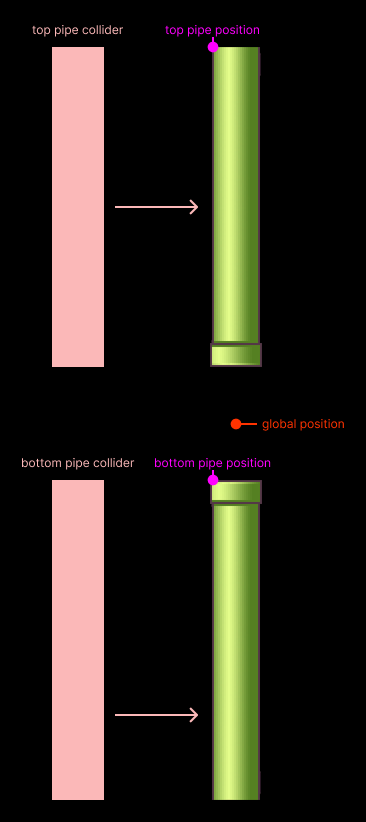
My idea to implement the pipes is the following:
- We will have just one class that will draw and handle both (top and bottom) pipes.
- Each pipe will have it's internal position, but the class will exposes a global position property that when updated will update both pipes.
- I want to position the pipes from a point in the center.
- We will create two rectangles to serve as collider for each pipe.
Something like:
public class Pipe
{
    private readonly Texture2D _texture;
    private Vector2 _position;
    private Rectangle _topPipeSrcRect = new Rectangle(112, 646, 52, 320);
    private Rectangle _bottomPipeSrcRect = new Rectangle(168, 646, 52, 320);

    public Vector2 TopPipePosition { get; private set; }
    public Vector2 BottomPipePosition { get; private set; }

    public Vector2 Position
    {
        get => _position;
        set
        {
            float halfPipeWidth = _topPipeSrcRect.Width / 2f;
            float pipeHeight = _topPipeSrcRect.Height;
            float halfGap = GapBetweenPipes / 2f;

            TopPipePosition = new Vector2(value.X - halfPipeWidth, value.Y - pipeHeight - halfGap);
            BottomPipePosition = new Vector2(value.X - halfPipeWidth, value.Y + halfGap);

            _position = value;
        }
    }

    public float GapBetweenPipes = 90f;

    public Pipe(Texture2D texture, Vector2 position)
    {
        _texture = texture;
        Position = position;
    }

    public void Draw(SpriteBatch batch)
    {
        batch.Draw(_texture, TopPipePosition, _topPipeSrcRect, Color.White);
        batch.Draw(_texture, BottomPipePosition, _bottomPipeSrcRect, Color.White);
    }
}
First, I'm storing a reference of the texture inside the class.
Actually, since I'm using the texture just inside the Draw, we could even pass it via parameter
(something like Draw(SpriteBatch batch, Texture2D texture)).
Then I'm defining the source rectangles (or clipping rectangles) for drawing just the top and bottom pipes from the texture atlas/spritesheet.
We need two Vector2 for each pipe, because each SpriteBatch.Draw requires it.
I'm exposing both TopPipePosition and BottomPipePosition as (public) get and private set
because I don't want to set different positions for the pipes in the same pipes set. That is, both pipes must follow
a common point. Actually we could even make this field private, but perhaps you need the position of some pipe for
something.
Then comes the Position property with a custom setter:
Always when we update the position of the pipe
(pipe.Position = somewhere) we need to update both pipes to follow that common point.
The first thing I'm getting is half of the width of the pipe.
Because since the anchor point of the sprite is at the top-left corner (remember?) to center it at some point we just need to move it half of it's own width or height.
So we will make both TopPipePosition and BottomPipePosition have the exact position as the
common point in the X and Y and subtract pipeWidth / 2 in the
X-axis to center them horizontally at this point.
In the Y-axis, the bottom pipe (the pipe that points upward) is pratically correct, so let's focus on
the top one.
As we did with the ground, we need to subtract the whole height of the pipe from it's Y-axis to position
the bottom part of the image at the global position (or the top of the bottom pipe).
Nice, things are almost perfect now, except that both pipes will be glued together.
To solve this, we just need to subtract a gap from the top pipe and add to the bottom pipe. That is the goal of the
GapBetweenPipes (or the halfGap).
If we create an instance of the pipe:
public class Game1 : Game
{
    ...

    private Pipe _pipe;

    ...

    protected override void LoadContent()
    {
        ...

        Vector2 windowCenter = new Vector2(
            _graphics.PreferredBackBufferWidth / 2f,
            _graphics.PreferredBackBufferHeight / 2f
        );
        _pipe = new Pipe(_texture, windowCenter);
    }

    ...

    protected override void Draw(GameTime gameTime)
    {
        ...

        _spriteBatch.Begin(samplerState: SamplerState.PointClamp);

        ...

        _pipe.Draw(_spriteBatch);

        _spriteBatch.End();

        ...
    }
}
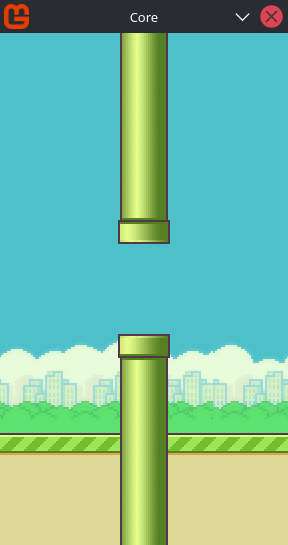
Nice, we have our pipes now. It doesn't have the colliders yet but just for a while.
Now we need to spawn pipes infinitely after some interval, scroll them across the screen and remove them later.
Timer
I decided to make this a dedicated section because the idea here can be expanded and used in many different situations.
There is many ways of implementing a timer, but I'll consider just one here:
Why just this one? Personal preference, this approach is I use the most, but for sure you can use any other approach if you prefer 😜.
Delta Time
In short, delta time is the interval between the current frame and the previous one.
You usually use this interval to compensate UPS/FPS oscilations that is very common in different hardwares.
If you want to know more about this:
- Understanding framerate independence and deltatime - ClearCode (YouTube)
- Dear Game Developers, Stop Messing This Up! - Jonas Tyroller (YouTube)
- SDL3 Game Loop, Frames Per Second (FPS) Counter, Delta Time, [SDL3 Episode 11] - Mike Shah (YouTube)
By the way, we should use this during the background scroll, but I decided to avoid it at least during this course.
But for this case, using delta time to create a timer is really convenient.
In MonoGame you retrieve the delta time from the GameTime parameter from both Update and Draw methods:
float delta = (float)gameTime.ElapsedGameTime.TotalSeconds;
To create a timer with this is very simple:
float _elapsed;
float _interval = 2f; // 2 second
bool _isRunning = true;

Update(GameTime gameTime) {
    float delta = (float)gameTime.ElapsedGameTime.TotalSeconds;

    if (_isRunning) {
        _elapsed += delta;
        if (_elapsed >= _interval) {
            // do something

            _isRunning = false;
            _elapsed = 0f;
        }
    }
}
When you accumulate the delta time (the interval) between frames, in one second you will have exactly... one second 😱 (or almost).
This approach is usually safe, but it still have some problems:
- If during the timer your game "freeze" for an interval bigger than the interval set in your timer, when you game return to life, the timer will finish immediatelly. For example, you timer is set to 2 seconds and your game freezes for 3 seconds, the delta time will be of 3 seconds so... you alarm finishes.
- We don't have a guarantee that the current delta time will be the exact same value in the next frame, or the same as the previous one, which means that, in a looping timer, sometimes it will end later or earlier.
To mitigate the problem of the delta time getting bigger than the interval of your timer:
...
float _maxDelta = 1f / 20f; // 20 FPS

Update(GameTime gameTime) {
    float delta = (float)gameTime.ElapsedGameTime.TotalSeconds;

    if (_isRunning) {
        float frameTime = MathF.Min(_maxDelta, delta);

        _elapsed += frameTime;
        if (_elapsed >= _interval) { ... }
    }
}
🥸 By the way, this approach presented by Glenn Fiedler is really interesting and important, specially in context of physics engines (We'll use one in the future). Not every situation need to follow this pattern, but some (like this one) might be interesting to consider.
The idea is simple:
# normal
delta = 0.016s (60 FPS)

frameTime = min(0.05, 0.016)
frameTime = 0.016

# lag
delta = 0.2s (5 FPS)

frameTime = min(0.05, 0.2)
frameTime = 0.05s
As you can see in the "lag" situation, by clamping the interval we are ignoring about of 150 ms delay.
💡 If for some reason you want to change the max delta interval, for safety choose a value between 15 to 30 FPS.
And to fix the problem when you timer need to loop:
float _elapsed;
float _interval = 2f; // 2 second
bool _isRunning = true;

Update(GameTime gameTime) {
    float delta = (float)gameTime.ElapsedGameTime.TotalSeconds;

    if (_isRunning) {
        float frameTime = MathF.Min(_maxDelta, delta);
        _elapsed += frameTime;

        if (_elapsed >= _interval) {
            // do something

            _elapsed -= interval;
        }
    }
}
We just need to subtract the interval that we are trying to reach from the accumulated interval. If during the current loop remain some accumulate interval it will compensate some delta variation in the next loop cycle.
💡 Doing this only is necessary if you need a looping timer, if you timer will run just once or a few times, you can set _elapsed to 0 and your _isRunning to false directly.
Nice, this looping timer is exactly what we'll need to spawn our pipes.
Spawning Pipes
We will need a dynamic array to store and destroy pipes dinamically and some variables for the timer:
public class Game1 : Game {
    ...
    private List<Pipe> _pipes = [];
    private Vector2 _initialPipesPosition;

    private float _pipesSpawnInterval = 1.5f;
    private float _pipesSpawnElapsed;
    private float _maxDelta = 1f / 20f;
    ...
    protected override void Initialize()
    {
        ...

        _initialPipesPosition = new Vector2(
            _graphics.PreferredBackBufferWidth + 30f, // window width + 30px
            _graphics.PreferredBackBufferHeight / 2f
        );

        ...
    }
    ...
    protected override void Update(GameTime gameTime)
    {
        ...
        ScrollGround();

        HandlePipesSpawning(gameTime);
        ScrollPipes();
        DestroyPipesOutsideScreen();

        Console.WriteLine(_pipes.Count);

        ...
    }

    private void HandlePipesSpawning(GameTime gameTime)
    {
        float delta = (float)gameTime.ElapsedGameTime.TotalSeconds;
        float frameTime = MathF.Min(_maxDelta, delta);
        _pipesSpawnElapsed += frameTime;
        if (_pipesSpawnElapsed >= _pipesSpawnInterval)
        {
            CreatePipe();
            _pipesSpawnElapsed -= _pipesSpawnInterval;
        }
    }

    private void CreatePipe()
    {
        var pipe = new Pipe(_texture, _initialPipesPosition);
        _pipes.Add(pipe);
    }

    private void ScrollPipes()
    {
        foreach (var pipe in _pipes)
        {
            var position = pipe.Position;
            position.X -= _groundScrollSpeed;
            pipe.Position = position;
        }
    }

    private void DestroyPipesOutsideScreen()
    {
        for (int i = 0; i < _pipes.Count; i++)
        {
            var pipe = _pipes[i];
            if (pipe.Position.X + 30f < 0f)
                _pipes.RemoveAt(i);
        }
    }

    ...

    protected override void Draw(GameTime gameTime)
    {
        ...

        foreach (var pipe in _pipes)
            pipe.Draw(_spriteBatch);

        _spriteBatch.Draw(_texture, _groundPos1, _groundSrcRect, Color.White);
        ...
    }
}
Do some effort and try to understand this code by yourself, because everything here is simple and a compilation of everything I shown previously.
The only thing relevant to mention here is about the _initialPipesPosition: only the value of it's X-axis is relevant for us because we will position the pipe in the y dynamically and randomly.
This is what we have now:
What we need now is position the pipes randomly in the y-axis:
🤔 pipes count is the amount of pipes currently being updated and drawn. Just to make sure that the pipes are being correctly destroying.
Creating Pipes at random Y
public class Game1 : Game {
    ...
    private float _minPipeY = 130f;
    private float _maxPipeY = 290f;
    private MathHelper.Random _rng = new MathHelper.Random();
    ...
    private void CreatePipe()
    {
        var position = new Vector2(
            _initialPipesPosition.X,
            _rng.NextFloat(_minPipeY, _maxPipeY)
        );
        var pipe = new Pipe(_texture, position);
        _pipes.Add(pipe);
    }
    ...
}
Things should be obvious here. The only part relevant is about: why I'm using MathHelper.Random instead of the default System.Random?
Because this random number generator from MonoGame's MathHelper utility is more optimized for our games than the default one from C#'s namespaces.
And about the 130 and 290 values in both _minPipeY and _maxPipeY, I just tested some values and I liked these, there's nothing special in them, you can for sure change both.
Finally, if we test our game now:
If you read so far thank yoooou so much 😍 for the effort.
In the next chapter we will finally create the bird, read input from the keyboard, make the bird fall and jump and so on 🧡.
See you soon 👋